
Best AI Extensions for Chrome: 10 Tools to Boost 2025 Productivity

Picture this: You’re juggling three client projects, responding to endless emails, and trying to create content that actually converts. Sound familiar? Welcome to 2025, where using the right AI extension for Chrome has become the secret weapon for anyone serious about productivity.
The rise of AI-powered Chrome extensions isn’t just another tech trend; it’s a productivity revolution happening right in your browser. These smart tools are transforming how young professionals tackle their daily grind, how content creators streamline their workflow, and how students manage their academic workload. No more switching between a dozen different apps or losing your train of thought while hunting for the right tool.
But here’s the thing. With hundreds of AI extensions for Chrome flooding the Web Store, finding the right ones feels like searching for a needle in a haystack. Most people end up with a cluttered browser and zero productivity gains. That’s where this guide comes in, curating the top 10 AI Chrome extensions that actually deliver results.
The Productivity Paradox: Why More Tools Mean Less Efficiency
Ever notice how having more productivity tools sometimes makes you less productive? It’s not just you.
Modern workers are drowning in a sea of applications, platforms, and browser tabs. Research shows the average knowledge worker switches between apps 1,100 times per day. That’s once every 40 seconds! Each switch costs you focus, energy, and precious time.
Students spend more time figuring out which tool to use than actually studying. Content creators lose their creative flow jumping between writing apps, research tools, and editing software. Remote workers? They’re stuck in a perpetual state of digital overwhelm.
The solution isn’t adding more tools to your arsenal. It’s about finding the right AI extension for Chrome that works seamlessly within your existing workflow tools that enhance rather than interrupt your natural browsing experience.
Best AI Extensions for Chrome That Work Seamlessly
No need to open 10 tabs or launch 5 apps anymore. These AI Chrome extensions are like your productivity co-pilot right there in the tab you’re already using.
Here’s what the best ones do:
- Write faster with autocomplete
- Summarize long content instantly
- Fix your grammar and tone
- Save responses and automate replies
- Pull AI into any webpage with one shortcut
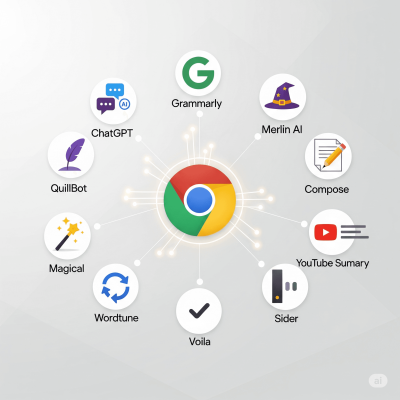
Top 10 AI Extensions for Chrome in 2025
Find your ideal AI extension for Chrome from this list tailored for creators, students, and busy professionals.
What it does: Brings OpenAI’s ChatGPT directly into Chrome, letting you highlight any text and instantly get AI responses.
Best for: Writers, researchers, content creators, and developers.
Use cases:
- Explaining complex topics
- Generating code snippets
- Brainstorming ideas while browsing
Browser experience: Works with a simple sidebar or right-click—no tab switching needed.
What it does: Transforms ChatGPT into a personal assistant that works across Google Search, Gmail, LinkedIn, and more.
Best for: Job seekers, marketers, customer support professionals.
Use cases:
- Replying to emails faster
- Auto-completing search queries with AI
- Summarizing LinkedIn posts
Browser experience: Snappy interface, appears wherever you need it—Gmail, Docs, etc.
What it does: Autocompletes your sentences as you type—like Gmail’s Smart Compose, but smarter.
Best for: Busy professionals, email-heavy roles, support agents.
Use cases:
- Writing faster emails
- Drafting replies with tone control
- Saving typing time daily
Browser experience: Works seamlessly inside any text field.
What it does: Paraphrasing and rewriting tool that helps you sound clearer and smarter.
Best for: Students, academic writers, content marketers.
Use cases:
- Avoiding plagiarism
- Simplifying complex sentences
- Editing for tone and clarity
Browser experience: Highlight text and right-click to paraphrase instantly.
What it does: Grammar and tone checker that’s been upgraded with AI writing suggestions.
Best for: Literally everyone who writes.
Use cases:
- Fixing typos and grammar in real time
- Adjusting tone to be more confident or friendly
- Getting AI rewrite suggestions
Browser experience: Works across all text fields and documents.
What it does: Lets you save text snippets and use keyboard shortcuts to insert them anywhere.
Best for: Customer support, sales teams, and anyone who repeats themselves often.
Use cases:
- Instant replies in emails or chat
- Reusing standard phrases or pitches
- Automating daily responses
Browser experience: Invisible until you need it. Feels like magic
What it does: Instantly summarizes YouTube videos using AI—no need to watch full videos.
Best for: Students, busy learners, marketers doing research.
Use cases:
- Learning faster from tutorials
- Skipping to the key points
- Extracting summaries for notes
Browser experience: Adds a “Summarize” button below YouTube videos.
What it does: AI writing enhancer that rewrites sentences with different tones or lengths.
Best for: Writers, students, creators looking for alternatives in writing.
Use cases:
- Making content more formal or casual
- Cutting down wordy sentences
- Rewriting to be more engaging
Browser experience: Pops up while typing and offers real-time rewrites.
What it does: ChatGPT-style assistant that also lets you summarize PDFs, rewrite emails, and chat side-by-side.
Best for: Students, researchers, and remote workers who deal with documents.
Use cases:
- Summarizing academic papers
- Drafting reports
- Editing long-form content
Browser experience: Floating sidebar with multi-tool layout.
What it does: An AI assistant that helps with emails, social posts, replies, and even summaries—just like ChatGPT, but embedded.
Best for: Founders, freelancers, and solo marketers.
Use cases:
- Responding to clients
- Creating short-form content
- Organizing daily tasks
Browser experience: Clean, fast UI. Works across tabs.
Choosing Your AI Arsenal: AI Extension for Chrome Comparison
For Writing Excellence: Grammarly and Wordtune form an unbeatable combination. Grammarly handles the technical accuracy while Wordtune enhances expression and clarity.
For Content Creation: Merlin AI and Compose AI work beautifully together. Merlin generates ideas and outlines while Compose AI helps with the actual writing process.
For Research and Summarization: YouTube Summary and Sider excel at processing information quickly. Perfect for students and researchers who need to consume large amounts of content efficiently.
For Email and Communication: Magical and ChatGPT for Chrome streamline professional communication. Magical handles repetitive responses while ChatGPT crafts personalized messages.
For General Productivity: Voila and QuillBot offer versatile solutions that adapt to multiple use cases. Ideal for users who prefer fewer extensions with broader functionality.
The key isn’t using all ten extensions simultaneously. That defeats the purpose of streamlining your workflow. Instead, identify your primary pain points and choose 2-3 extensions that address those specific challenges.
Try a Few (Stick with What Works)
You don’t need to install them all. Honestly? That’s just another distraction.
Choosing the right AI extension for Chrome can transform your productivity stack in 2025.
Try 2–3 tools from this list that match your current workflow. Stick with them for a week. Let them settle in. You’ll start seeing the difference.
Productivity isn’t about doing more. It’s about doing less, better.
📥 Want a quick checklist of these tools + best use cases?
Download the AI Chrome Extensions Checklist here
Or follow our blog for more no-fluff tips to stay ahead in 2025.